
Just a quick post today as I had a insane day yesterday, getting everything ready for my son to start kindergarten and I am not done yet!
I have NOT received any tracking information on my eCraft, so unfortunately I don't think I will get it this week. I think that Craftwell has underestimated how long it can take for things to go through Customs, and how long it would take for them to get these machines shipped to the stores. I will update you all when I have an actual tracking number, and then I will hunt down the Postman/UPS Guy/FedEx Guy until I have my machine! LOL!
I read a very interesting post over at Clever Someday. Kay has really put a lot of work into getting all the information about the Cricut Imagine and it is worth it. If you are even remotely thinking about getting a Cricut Imagine, go read THIS post, as Kay goes through all the positives and negatives of the machine.
Stop by tomorrow, because I have a gorgeous card to share with all of you using a stamp set that screamed at me to buy it! Have a great day!
Showing posts with label Cricut Imagine. Show all posts
Showing posts with label Cricut Imagine. Show all posts
Thursday, August 12, 2010


Monday, August 2, 2010
PTI CHA Exclusive Stamp Set

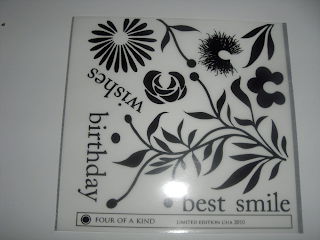
One of the first things that I wanted to play with from CHA is the Papertrey Ink CHA Exclusive Stamp Set called 4 of a Kind. This is a great floral set. It has one large stem with leaves, and then you add one of the four flower images. I decided to stamp the stem image in Dark Chocolate on Vintage Cream cardstock. I then used the "Rock and Roll" technique on the flower image using Summer Sunrise and Orange Zest ink. I love this color combination! I used the Spellbinders Nestabilities Label Nine dies to cut out part of the image and also the PTI Dark Chocolate felt . I embellished the felt with a little Summer Sunrise Saddle Stitch ribbon. I also used my Scor-Pal to score two lines that sandwich the Smile sentiment which is also from 4 of a Kind and stamped in Vintage Cream ink. I absolutely love how this card turned out, and I have SO many other ideas of how I can use this stamp set. I can see how this this would make for a great background paper...oh and stamping the flowers in Versamark and embossing them would look great! This is also my first time using the PTI felt, and I love it! I got three of the colors at CHA and plan on getting the rest on my next order!
On another note, Cathy T posted a comment on my post from the other day where I showed a cut out of the Cricut Imagine cuts, reminding me that the machines that the demos are using are prototypes. Cathy is right, these are prototypes. However I think if you are considering getting the Cricut Imagine, you should consider this...they are only 6 weeks away from launch. If I am going to spend $600 dollars on a machine that is going to do Print and Cut, I want it to be perfect! I would assume that this prototype is the the last prototype before the final version. It seems like this is something that should have been fixed before this point. I am reminded of the launch of the Gypsy. I actaully won a Gypsy and got one of the first ones available. I could see the potential of the Gypsy, but it was not up to snuff at that point. It was only about a month ago, that the Gypsy got to the point where I thought it was a worthwhile product. Everyone can of course make their own choices about how to spend their money, but if you are asking for my opinion....I say wait. The Cricut Imagine just may in the future get to the point where it is a great machine, as for me I would not gamble my money on that at launch. Thank you to Cathy T for the reminder, I love getting the feedback!
Don't forget to sign up for the GIVEAWAY!! Tomorrow I am going to showcase a really cool method to use with the PTI impression plates, so be sure to stop by! Have a great day everybody!
Saturday, July 31, 2010
CHA Supershow & Cricut Imagine News & an eCraft Video
So yesterday I went to the CHA Supershow and had a great time! My first stop was Papertrey Ink and boy were they crowded. They had lots of their sample projects up for us to view as we made our way through the line shopping as we went through! The exclusive CHA set is called 4 of a Kind, and looks beautiful. Here are a few quick pictures for you.

I went to many booths, but one of my must-dos was Peachy Keen Stamps. I always have loved the face stamps that go on the Cricut Paper Dolls, and I have never gotten one! So I picked one out, and was thrilled when they gave me this very cute t-shirt!


I also made my way to the Cricut booth to get a look at the Cricut Imagine. I did video part of a demo, but unfortunately the video turned out fuzzy. Found out later that there are fingerprints all over my lens from two little boys! Those rascals! But I did find out some important information. The Cricut Imagine does NOT work with Design Studio. Why you ask? Well because in about 6 months Cricut is going to launch a product that will allow you to work with the Cricut Imagine and your computer. So I asked is this whole new software? The answer I got is that the term for it may or may not be software. What could this be? I am not sure. Chris Dodge (the representative that I talked to) said that the beta product blew his mind. Well, we will have to see what happens. I do have to point out something else though, I was NOT impressed with the sample cuts that were laying on the table there. I actually snagged one so that I could get a real good picture of it to show you what I mean.

I can't wait for this! Well today I am hoping to get in a little bit of time to play with all my new goodies as I try to be patient for my eCraft.


I went to many booths, but one of my must-dos was Peachy Keen Stamps. I always have loved the face stamps that go on the Cricut Paper Dolls, and I have never gotten one! So I picked one out, and was thrilled when they gave me this very cute t-shirt!

And look at these amazing Cuttlebug folders that I got! I cannot wait to use the peacock feathers one! And the reptile skin one will be perfect for the loads of dinosaur stuff that I do for my little dinosaur lover!

I also made my way to the Cricut booth to get a look at the Cricut Imagine. I did video part of a demo, but unfortunately the video turned out fuzzy. Found out later that there are fingerprints all over my lens from two little boys! Those rascals! But I did find out some important information. The Cricut Imagine does NOT work with Design Studio. Why you ask? Well because in about 6 months Cricut is going to launch a product that will allow you to work with the Cricut Imagine and your computer. So I asked is this whole new software? The answer I got is that the term for it may or may not be software. What could this be? I am not sure. Chris Dodge (the representative that I talked to) said that the beta product blew his mind. Well, we will have to see what happens. I do have to point out something else though, I was NOT impressed with the sample cuts that were laying on the table there. I actually snagged one so that I could get a real good picture of it to show you what I mean.

Do you notice how the borders are way off? I saw this on not all the cuts but several of them. I kind of think that this means that the "Cricut Creep" has not been fixed! I did also ask if there was an option to change the border width, and I was told yes however you cannot tell it to do no border. He said that the smallest border would be about 1 mm, but that also may depend on the art itself. He indicated that changing the border was not on the machine yet, that it would be on a firmware update. It may be hard to see in the picture, but I also found that some of the images look great but some look a little pixelated.
As for me, I think the hinge method works alot better for print and cut then the Cricut Imagine does at this time. If you are not familiar with the hinge method, check out this post on Kay's blog Clever Someday. She developed this method, and I have to give her thanks. I have used this method a few times and love it!
Also, SVGCuts.com put out a video of the eCraft from CHA and in this video we got a little peak at the software along with seeing the machine in action.
If this is your first time here, be sure to sign up for the GIVEAWAY!! Have a great day everybody!
Wednesday, July 28, 2010
More on the Cricut Imagine!
So the first videos of the CHA vendor show are showing up on YouTube, and there are some exciting things happening! One of the products that is making a big splash is the Cricut Imagine. I have spent quite a bit of time looking at the Imagine and I think there are some things that everyone should consider before purchasing one of these machines.
1. Do you like the look of the printed images? A lot of people on the Cricut messageboard are debating this very issue. I personally don't really care for them because I think they look too put together. They look very professional, and I feel like they lose some of that homemade feel. This is the very reason why I am learning Hybrid Scrapbooking instead of full on Digital Scrapbooking. Now as more and more examples of what this machine can do floods the internet, I may change my mind. Cricut is promoting that with this machine, you won't need to buy any paper other than white which is true, however I like my paper. I love the colors, the textures, the glitter, the foil all of it, so is this realistic. For me it is not. I have a digital library of digital papers which I love to use and tweak to work for my purpose. I also have quite a supply of colored cardstock as well as patterned papers that I love to look at and it inspires me. When I feel that I am in a craft slump, I go to my paper! Now there are some people out there that have trouble coordinating papers and finding colors that work together. If that is you, this machine could be a great thing because all the patterns and colors on the special Imagine cartridges have been colored by artists, and they also offer some alternate color options that work together.
2. What can it cut? According to one of the videos that I saw, the Imagine can cut pliable material. Since it is pliable material, that means that chipboard is out. I also wonder about magnet sheets, my guess would be that this can not be cut on the Imagine. If you don't cut chipboard or magnet sheets, then the Imagine may be the machine for you. I don't necessarily cut a lot of chipboard or magnet sheets, however I like having the ability to do so.
3. The Price! With a whopping price of $599 for the machine, this is definately a factor. Of course, this price will come down. The only thing that we don't know is when the price will come down and how much it will come down. Other than the initial cost, you also have to consider the cost of the peripherals. There are the mats, the ink cartridges, the new Imagine art cartridges, and the new Imagine pattern cartridges. That is a lot of stuff. According to one of the videos that I saw, the machine comes with one Imagine art cartridge. No word as to whether the machine comes with the ink cartridges (I would guess that if comes with one of each, but this has not yet been reported.) Also the ink cartridges are pricey, $34.99 for black, and $39.99 for the tri color cartridge. That is right, tri color cartridges, it is funny but I had thought that the printing industry was moving away from this and going to seperate cartridges for each color. My printer takes a total of six cartridges! That way, if I run out of yellow, I just have to replace the yellow cartridge instead of all the colors. Apparently, these cartridges will only be available from Cricut.com and stores that carry the machine. This is something to consider, because if you don't live near a store that carries the machine, you will have to order online. This can be most incovenient if you run out and don't have a replacement on hand. All in all, this will be an expensive machine to run.
As I was perusing the Cricut messageboard, there was not a lot of excitement around the Imagine, which was kind of suprising. Most of the people that said they were not going to get one, listed one of the above reasons. We have seen this before of course, with the Gypsy, and there are quite a few Gypsy owners out there, so I wonder if this is everyone's first instincts are skepticism. We have to remember that with the Gypsy, it took 9 months after release before the Gypsy operated the way it was promised at launch. I wonder if this is going to be the case with the Imagine. Will the messageboard have Imagine owners on there that are complaining that the machine doesn't work as promised? Or with Provo Craft suprise us all, and have a machine that works as promised right out of the box. I certainly hope that those that get the Imagine will be happy with it, because at $599, you deserve it!
Here is one of the videos on the Cricut Imagine that I found the most informative.
IMHO, if you are considering this machine, you should wait until it is in the hands of crafters and see if they like it first. I know what you are saying..."But Denise you didn't do this with the e-craft!" You are right, but I also have listened carefully to what the beta testers have been allowed to tell us, and I did not plunk down $599 either! I normally would never buy something that hasn't been reviewed by users first, but I did make an exception this time, and I certainly hope it works out OK. There are several features that the eCraft claims to have that no other cutter has. There was one factor that put it over the top for me, and that has to do with Craftwell itself. A lot of people have criticized Craftwell for delaying the release of the eCraft. I see it a little differently. Let me try to explain...if you are a company that has a prototype of a product and you are trying to decide if this product is worth the time and investment into perfecting, what would you do? Well you would probably have focus groups, but you might also take it to a show like CHA and do some live demos and hear from vendors that actually would have to sell the machine. I think that is exactly what Craftwell did in the Summer of 2009. Based on the reaction and feedback that they got on the machine, I think that they knew they had to make this machine work exactly the way crafters want it to work. So they got it into hands of beta testers, who came back to them and said, these are the things that you should change, these things are great as is, and these are the things that need to be added. Once you have that list, you now have to put it into the hands of your engineers to see if it is even feasible to make those changes. Then you build another prototype to test it and see how well it works. If you are truly trying to make a great product that is going to put your company on the map, then chances are even with this new and improved model there are going to be some minor changes that have to be made before it is ready to go into mass production. All of this takes time. I believe that this is what Craftwell is doing. Why do I believe that? Well in the beginning of June on a Sunday, I sent an e-mail to Craftwell's customer service asking them some questions. I got a response two hours later...on a Sunday! This response was not a form letter, or even from a low level customer service representative. This response was from the Vice President. He also gave me his direct line phone number so that I could call him if I had any more questions! Customer Service is the key here. How many corporations can you say give you that kind of customer service? When you have a company that provides great customer service, you almost always have great products as well because they listen! If I had not gotten that e-mail, I probably would not have pre-ordered the machine.
On a final note, I think that the Imagine could be a great machine for some people, but I am curious what all of you think so far, so please let me know!
If this is your first visit to my blog, be sure to sign up for the GIVEAWAY!
1. Do you like the look of the printed images? A lot of people on the Cricut messageboard are debating this very issue. I personally don't really care for them because I think they look too put together. They look very professional, and I feel like they lose some of that homemade feel. This is the very reason why I am learning Hybrid Scrapbooking instead of full on Digital Scrapbooking. Now as more and more examples of what this machine can do floods the internet, I may change my mind. Cricut is promoting that with this machine, you won't need to buy any paper other than white which is true, however I like my paper. I love the colors, the textures, the glitter, the foil all of it, so is this realistic. For me it is not. I have a digital library of digital papers which I love to use and tweak to work for my purpose. I also have quite a supply of colored cardstock as well as patterned papers that I love to look at and it inspires me. When I feel that I am in a craft slump, I go to my paper! Now there are some people out there that have trouble coordinating papers and finding colors that work together. If that is you, this machine could be a great thing because all the patterns and colors on the special Imagine cartridges have been colored by artists, and they also offer some alternate color options that work together.
2. What can it cut? According to one of the videos that I saw, the Imagine can cut pliable material. Since it is pliable material, that means that chipboard is out. I also wonder about magnet sheets, my guess would be that this can not be cut on the Imagine. If you don't cut chipboard or magnet sheets, then the Imagine may be the machine for you. I don't necessarily cut a lot of chipboard or magnet sheets, however I like having the ability to do so.
3. The Price! With a whopping price of $599 for the machine, this is definately a factor. Of course, this price will come down. The only thing that we don't know is when the price will come down and how much it will come down. Other than the initial cost, you also have to consider the cost of the peripherals. There are the mats, the ink cartridges, the new Imagine art cartridges, and the new Imagine pattern cartridges. That is a lot of stuff. According to one of the videos that I saw, the machine comes with one Imagine art cartridge. No word as to whether the machine comes with the ink cartridges (I would guess that if comes with one of each, but this has not yet been reported.) Also the ink cartridges are pricey, $34.99 for black, and $39.99 for the tri color cartridge. That is right, tri color cartridges, it is funny but I had thought that the printing industry was moving away from this and going to seperate cartridges for each color. My printer takes a total of six cartridges! That way, if I run out of yellow, I just have to replace the yellow cartridge instead of all the colors. Apparently, these cartridges will only be available from Cricut.com and stores that carry the machine. This is something to consider, because if you don't live near a store that carries the machine, you will have to order online. This can be most incovenient if you run out and don't have a replacement on hand. All in all, this will be an expensive machine to run.
As I was perusing the Cricut messageboard, there was not a lot of excitement around the Imagine, which was kind of suprising. Most of the people that said they were not going to get one, listed one of the above reasons. We have seen this before of course, with the Gypsy, and there are quite a few Gypsy owners out there, so I wonder if this is everyone's first instincts are skepticism. We have to remember that with the Gypsy, it took 9 months after release before the Gypsy operated the way it was promised at launch. I wonder if this is going to be the case with the Imagine. Will the messageboard have Imagine owners on there that are complaining that the machine doesn't work as promised? Or with Provo Craft suprise us all, and have a machine that works as promised right out of the box. I certainly hope that those that get the Imagine will be happy with it, because at $599, you deserve it!
Here is one of the videos on the Cricut Imagine that I found the most informative.
IMHO, if you are considering this machine, you should wait until it is in the hands of crafters and see if they like it first. I know what you are saying..."But Denise you didn't do this with the e-craft!" You are right, but I also have listened carefully to what the beta testers have been allowed to tell us, and I did not plunk down $599 either! I normally would never buy something that hasn't been reviewed by users first, but I did make an exception this time, and I certainly hope it works out OK. There are several features that the eCraft claims to have that no other cutter has. There was one factor that put it over the top for me, and that has to do with Craftwell itself. A lot of people have criticized Craftwell for delaying the release of the eCraft. I see it a little differently. Let me try to explain...if you are a company that has a prototype of a product and you are trying to decide if this product is worth the time and investment into perfecting, what would you do? Well you would probably have focus groups, but you might also take it to a show like CHA and do some live demos and hear from vendors that actually would have to sell the machine. I think that is exactly what Craftwell did in the Summer of 2009. Based on the reaction and feedback that they got on the machine, I think that they knew they had to make this machine work exactly the way crafters want it to work. So they got it into hands of beta testers, who came back to them and said, these are the things that you should change, these things are great as is, and these are the things that need to be added. Once you have that list, you now have to put it into the hands of your engineers to see if it is even feasible to make those changes. Then you build another prototype to test it and see how well it works. If you are truly trying to make a great product that is going to put your company on the map, then chances are even with this new and improved model there are going to be some minor changes that have to be made before it is ready to go into mass production. All of this takes time. I believe that this is what Craftwell is doing. Why do I believe that? Well in the beginning of June on a Sunday, I sent an e-mail to Craftwell's customer service asking them some questions. I got a response two hours later...on a Sunday! This response was not a form letter, or even from a low level customer service representative. This response was from the Vice President. He also gave me his direct line phone number so that I could call him if I had any more questions! Customer Service is the key here. How many corporations can you say give you that kind of customer service? When you have a company that provides great customer service, you almost always have great products as well because they listen! If I had not gotten that e-mail, I probably would not have pre-ordered the machine.
On a final note, I think that the Imagine could be a great machine for some people, but I am curious what all of you think so far, so please let me know!
If this is your first visit to my blog, be sure to sign up for the GIVEAWAY!
Tuesday, July 27, 2010
Cricut Imagine Videos!!!
One of the blogs I follow is Tammy Skinner's HERE, and she is at CHA and posted some videos on her Facebook. Go to Facebook and send her a friend request so that you can access these videos. Very interesting information in the videos that I will summarize here for you.
1. Cricut Imagine works with old and new cartridges. There are also a 2nd type of cartridge that appears to have different patterns and colors that the machine can print. There are two cartridge ports on the machine, the first for the standard cartridge and the second for these pattern cartridges.
2. Cricut Imagine is like 3 machines in one, a HP Printer, an Expression, and a Gypsy.
3. The mats are different for the Cricut Imagine, they have sensors along the edges to tell the machine where everything it at for cutting after the printing is complete. Supposedly the MSRP on the mats will be similar to the current Cricut mats. They also are using a different adhesive on these mats that supposedly will not peel up and stick to the back of the paper. The rep also implied that these mats would last longer.
4. There are 2 print cartridges for the machine, black (MSRP $34.99) and a tri-color cartridge ($39.99).
5. The touch screen allows you to select each part of the image to change colors and patterns. The images can be printed flat (all in one piece) or printed in seperate pieces for layering.
A couple of questions that I have after seeing these videos. The first and most important to me is...since there is a built in Gypsy, does this mean that there is not a USB jack on the machine that can be plugged into either existing Gypsys or a computer. If this is the case, that means that this is how PC is planning on eliminating Imagine owners from using third party software. Also, these pattern cartridges, how much are they? The mats, can they be restickied? I am holdiing off judgement for now. What are your thoughts?
If you are having trouble finding Tammy on Facebook since there are so many, try this link to her profile http://www.facebook.com/profile.php?id=1313016943
UPDATE: The Cricut Imagine DOES have a USB jack!
1. Cricut Imagine works with old and new cartridges. There are also a 2nd type of cartridge that appears to have different patterns and colors that the machine can print. There are two cartridge ports on the machine, the first for the standard cartridge and the second for these pattern cartridges.
2. Cricut Imagine is like 3 machines in one, a HP Printer, an Expression, and a Gypsy.
3. The mats are different for the Cricut Imagine, they have sensors along the edges to tell the machine where everything it at for cutting after the printing is complete. Supposedly the MSRP on the mats will be similar to the current Cricut mats. They also are using a different adhesive on these mats that supposedly will not peel up and stick to the back of the paper. The rep also implied that these mats would last longer.
4. There are 2 print cartridges for the machine, black (MSRP $34.99) and a tri-color cartridge ($39.99).
5. The touch screen allows you to select each part of the image to change colors and patterns. The images can be printed flat (all in one piece) or printed in seperate pieces for layering.
A couple of questions that I have after seeing these videos. The first and most important to me is...since there is a built in Gypsy, does this mean that there is not a USB jack on the machine that can be plugged into either existing Gypsys or a computer. If this is the case, that means that this is how PC is planning on eliminating Imagine owners from using third party software. Also, these pattern cartridges, how much are they? The mats, can they be restickied? I am holdiing off judgement for now. What are your thoughts?
If you are having trouble finding Tammy on Facebook since there are so many, try this link to her profile http://www.facebook.com/profile.php?id=1313016943
UPDATE: The Cricut Imagine DOES have a USB jack!
Saturday, July 24, 2010
A Few of My Favorite Things...#3 Easy RGB
This is probably one of the coolest things that I have found so pay attention everyone! When I started recoloring digital paper, I found it so frustrating to find just the right color. The color that you see on the computer monitor often prints out looking different and then it doesn't look good with the other elements that you have put together. The patterned paper typically is the "binder" of a project. It is the thing that ties everything together. So because I was frustrated at losing so much paper and printer ink, I set out to find a way to match colors better. That is when I discovered easyRGB.com. What this site does is take commercial tints and gives you the RGB number and that funky 6 digit color number. First off what are commercial tints...well to be honest I don't really know, but I did recognize the names Benjamin Moore and Sherwin Williams as of course paint manufacturers.
So, I headed off to the paint store with a few samples of cardstock to match, and ended up finding quite a few matches. Some are exact matches and some are very close. I grabbed these paint samples and came back home and started putting in the RGB or 6 digit funky number in PSE8 and found that even if the match is close but not perfect it was good enough to me. The next time I was at Ace Hardware with my DH, I bought a Benjamin Moore fandeck. It cost $19.99, and now I have all the colors so I don't have to run to the store everytime I need to look up some color numbers.
Here is what the fandeck looks like... if you don't see it in the store ask someone, because most likely they have these somewhere!

Now for a sample of how to go about doing this. Grab a piece of paper that you want to match up and fan out your fandeck until you find a close color match. Please note that alot of times the colors you see in the fandeck may not look like a match because of the finish on them, so you really need to focus on the color itself and minimize the sheen that the paint chip shows you. That sheen I believe is the same reason why paint on the wall never looks the same as the paint chip. Here I have found a color match...

Now go to EasyRGB.com. On the home screen you are going to select "From Commercial Tints to RGB".

Next you are going to enter the Color Name or Color Number and then select from the drop down list the name of the collection you are looking at. For my example here I have entered Color Number 2074-20 and the Benjamin Moore Color Preview Collection.

Hit the Start Key and you get this screen. It lists my numbers as R- 122.66 G-62.04 B-98.86 and color code #7B3E63. Write these numbers down! If you watched my video tutorial from yesterday on how to recolor your digital paper you noticed that when you needed to select your new color it came up with a box with a slider bar that scrolled up and down all the colors of the rainbow. Next to that slider bar is a place to enter in your RGB numbers and your color code. Most photo editing software progams do not accept the deimal points so you would need to round up or down as necessary. If possible enter in that 6 digit color code instead.
Here are the results using that color example. I used a digital stamp (I believe it was from Digital2forTuesday, not sure if you recognize it as from somewhere else please let me know) and I recolored the stamp to that color. The stamp was printed on cream paper, here it is laying on top of the original cardstock.

I then took a digital paper (Lettering Delights - Chocolate collection) and recolored it to the same color so here are all three papers in one shot for you.
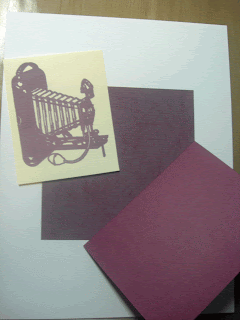
And here is it all put together, I inked the edges of the digital paper roughly to add a little contract using PTI Vintage Cream ink. The stamp image edges are inked with Tea Dye Distress Ink. The sentiment, the rustic twine, and the rustic wood button are all from Papertrey Ink.

On a different note, next Friday I will be attending the CHA Consumer Show and I plan on doing some videotaping while I am there. I am going to try to get into the Cricut booth and hopefully get a look at the new Imagine machine. If there is something that you would like to know about the Imagine machine or something else at CHA that you are interested in, please leave me a comment or send me an e-mail and I will try to accomodate everyone.
The giveaway is still open, so check out this POST to enter to win!
Have a nice day everyone!
So, I headed off to the paint store with a few samples of cardstock to match, and ended up finding quite a few matches. Some are exact matches and some are very close. I grabbed these paint samples and came back home and started putting in the RGB or 6 digit funky number in PSE8 and found that even if the match is close but not perfect it was good enough to me. The next time I was at Ace Hardware with my DH, I bought a Benjamin Moore fandeck. It cost $19.99, and now I have all the colors so I don't have to run to the store everytime I need to look up some color numbers.
Here is what the fandeck looks like... if you don't see it in the store ask someone, because most likely they have these somewhere!

Now for a sample of how to go about doing this. Grab a piece of paper that you want to match up and fan out your fandeck until you find a close color match. Please note that alot of times the colors you see in the fandeck may not look like a match because of the finish on them, so you really need to focus on the color itself and minimize the sheen that the paint chip shows you. That sheen I believe is the same reason why paint on the wall never looks the same as the paint chip. Here I have found a color match...

Now go to EasyRGB.com. On the home screen you are going to select "From Commercial Tints to RGB".

Next you are going to enter the Color Name or Color Number and then select from the drop down list the name of the collection you are looking at. For my example here I have entered Color Number 2074-20 and the Benjamin Moore Color Preview Collection.

Hit the Start Key and you get this screen. It lists my numbers as R- 122.66 G-62.04 B-98.86 and color code #7B3E63. Write these numbers down! If you watched my video tutorial from yesterday on how to recolor your digital paper you noticed that when you needed to select your new color it came up with a box with a slider bar that scrolled up and down all the colors of the rainbow. Next to that slider bar is a place to enter in your RGB numbers and your color code. Most photo editing software progams do not accept the deimal points so you would need to round up or down as necessary. If possible enter in that 6 digit color code instead.
Here are the results using that color example. I used a digital stamp (I believe it was from Digital2forTuesday, not sure if you recognize it as from somewhere else please let me know) and I recolored the stamp to that color. The stamp was printed on cream paper, here it is laying on top of the original cardstock.

I then took a digital paper (Lettering Delights - Chocolate collection) and recolored it to the same color so here are all three papers in one shot for you.

And here is it all put together, I inked the edges of the digital paper roughly to add a little contract using PTI Vintage Cream ink. The stamp image edges are inked with Tea Dye Distress Ink. The sentiment, the rustic twine, and the rustic wood button are all from Papertrey Ink.

On a different note, next Friday I will be attending the CHA Consumer Show and I plan on doing some videotaping while I am there. I am going to try to get into the Cricut booth and hopefully get a look at the new Imagine machine. If there is something that you would like to know about the Imagine machine or something else at CHA that you are interested in, please leave me a comment or send me an e-mail and I will try to accomodate everyone.
The giveaway is still open, so check out this POST to enter to win!
Have a nice day everyone!
Subscribe to:
Posts (Atom)


